TUTSOFT

7 Feb 2012

Wondershare Fantashow for Mac

Wondershare Fantashow for Mac
Wondershare Fantashow for Mac is the easiest yet fantastic way to turn your photos, videos and music into dazzling slideshows using well-designed Styles. Just drag and drop your photos, videos and audio, and the Styles brings them to life for you to share virtually anywhere. Whatever it's on YouTube, Facebook, TV, mobile devices, your shows will definitely amaze everyone, including yourself.
Key Features Make slideshows on Mac with photos, videos and audios
- 18 stunning themes instantly animate your photos and videos, including 3D themes. 
- Drag and drop to do almost everything. It's that easy.
- One-click to enhance your photos, videos and music.
- Add animated captions in 1 click with built-in text effects.
- 40 Intro/Credit/Blank clips make your shows more funny and attractive.
- Easily import media files from iPhoto, iTunes and GarageBand Share shows virtually anywhere
- YouTube - Directly upload shows on YouTube and Facebook.
- iDVD - Work seamlessly with iDVD to burn your fantastic shows to DVD.
- iTunes - Export to iTunes library for easy playback on Mac.
- Apple Device - Premiere your movies on iPhone, iPad, iPod, and Apple TV.
- Macintosh HD - Save either standard or high definition movies to Mac hard disk.

--------------------------------------------------------------------------------------------------------

Download and install Wondershare Fantashow for Mac and open it. You will see the Welcome screen as below.

Import Media Files

Fantashow comes with a Media Browser for you to easily import images, audios and videos to your project. Click the Media Browser icon to turn it on or off. When the media is added to the storyboard, drag and drop specific slide to arrange it. The most interesting feature here is that you can drag media out of Fantashow to delete it.
If you don't like the drab-n-drop operation, editing buttons are also easy to access, such as delete, rotate, and edit. Right click for the equivalent options.
Tip: Before moving forward, select suitable dimensions for your slideshow. If the show will be watched on mobile devices, the dimensions may be change when export. For a HD shows, select 1280*720 or 1920*1080.

Change Styles

30 Styles (themes) instantly bring your images to life. When you import photos and videos, styles will be automatically applied. To change it, simple drag and drop desired style to replace the original one. You are free to drag photo/video from one style to another. The other way is to increase the number of clips in a style, shown as below. To bring this dialog, mouse over a style and click the setting icon when it appears.
Besides the containing clip number of a style, you could also change the duration of clips and the background of style. Check the option "Apply to all clips" to make all clips have the same duration. Alternatively, right click any slide to bring up a menu from which select individual duration by Duration option. Also note that only General and 3D styles allows you to change the background to pre-design paper or a local image on Mac.

Edit Slideshow

Fantashow enables you to make basic editing to photos, videos and audios. Double click on desired photos or videos, or hit on edit button after highlighted target to open up editing dialog. Hit "Return" to confirm and "Restore" to give up changes.
Photo Editing: As you could see, there are 3 panels in the photo editing windows: Caption, Crop, and Filter. Simply select a text effect and click the sample text to input your own text. The texts you typed in the text field will turn to animated immediately. The Crop panel lets you easily crop interesting part of the photo in 4:3, 16:9 or any aspect ratio. One-click to add special effects to your photo choosing from 15+ filter effects.
Video Editing: In the video editing panel, you can easily trim video into multiple pieces and adjust the original volume to avoid conflicting with the added background audio. The trim feature provides precise control using a submenu with adjustment circle.
Audio Editing: Click the play button to preview or trim the desired portion by clicking the scissors button.
Intro/Credit/Blank slide: To make your shows more funny and professional, Fantashow provides many Intro, Credit and Blank slide templates. Just select Intro/Credit/Blank button, and drag and drop to storyboard to apply. Note that the Intro slides could only be added to the beginning of the show, while Credit to the end of shows. Blank slides will be very useful if you want to divide your shows into several chapters. You could edit these slides like photo slides, such as adding caption and changing duration.

Share Slideshow

It's the time to premiere your magic shows? OK, go to "Share" menu on top, and select the format you want. You could directly upload your shows to YouTube (simultaneously on Facebook if necessary), burn to DVD using iDVD or the built-in DVD burning tool (smaller size without menu), export to iTunes library for management, or watch on iPod/iPhone/iPad/Apple TV.
Tip: For sharing on Apple Device, you have no need to set the dimensions. The best dimensions and optimized parameters would be used.

AV Voice Changer Software Diamond Edition 7.0


AV Voice Changer Software Diamond Edition 7.0

Key Features of AV Voice Changer Software Diamond:

- High-quality voice output
- Voice comparator
- 2-Dimensional voice changing
- Audio & video stream interception
- Compatible with Internet-based programs
- Frequency & formant morphers
- Ready-to-use "nickvoices"
- Advanced equalizers, sound quality improver
- Audio effect explorer
- Adjustable sound parameters
- Recorder
- User-friendly interface, easy use
- Player
- Parody maker
- Parody mixer
- Voice analyzer


6 Feb 2012

Graphic Designing Best Software

Icon Maker
Icon Maker Software - Features 1.Icon Maker is a small and easy-to-use all-in-one icon utility for icon making, editing, changing, extracting, searching, and exploring. 2.With Icon Maker, you may edit your own professional icons easily and quickly with the built-in editor. 3.Icon Maker allows you editing a transparent or opaque icon. 3.The sizes may be 16 X 16, 32 X 32, 48 X 48, 64 X 64 or custom it as you like. 4.Supports 16x16 and 32x32 Full Transparency True Color Icons. 5.Icon Maker has most of the basic image editor type settings: pen, fill, eclipse, rect, text, selections, etc.'But also includes gradient rectangles and gradient eclipses. Also has mild support for custom brushes and my own type of plugins. 6.Drag and Drop is supported as well is bmp, gif or jpeg to icon conversion. 7.Icon Maker Can also load language packs for our non-english reading friends. 8.Included is the Main Project, some sample Plugins Projects, some custom brush files, a read me file about custom brushes and a read me concerning the language packs (with two example packs: one for english and the other for spanish). 9.Some subsets of the Main Project include dynamically loading custom language packs, winconnect (a custom activex for communication through different windows) and hard coding icons (not using savepicture via Visual Basic). 10.Blues, blur, Brighten, lighten, soften, darken, Color Swap (BRG, GBR, GRB, RGB) , lighten, Plaid, Diffuse, emboss, Glass, and more. 11.Support sizes 16 X 16, 32 X 32, 48 X 48, 64 X 64, and user custom 12.Windows Me/2000/2003/2007/ XP, Vista Compatible 13.Fast, small and easy-to-use 14.Filters functions allow you processing the icon with special effects such as Blues, blur, Brighten, lighten, soften, darken, Color Swap (BRG, GBR, GRB, RGB) , lighten, Plaid, Diffuse, emboss, Glass, and more. 15.license key for life time 16.Money Back Guarantee 17.Fully functional less than 5 days trial period


------------------------------------------------------------------------------------------------------------------------------

Icons

Icons (More than 30,000 best icons)
High quality professional royalty-free stock icons for your software, website, GUI design, presentations or other purpose.Our icons are the best way to improve the look of your products with minimum graphic design experience. All our icons are professional looking, sharp and colorful. In addition, we provide friendly, responsive and free support to everyone using our icons. High Quality Royalty-Free icons for Windows, Mac and Linux, Offers .ico, .png, .gif, .bmp, .icns various icons format. Search Icon Size [pixels] [16 x 16] ,[24 x 24] ,[28 x 28] ,[32 x 32] ,[48 x 48] ,[64 x 64] ,[72 x 72], [128 x 128] ,[255 x 255], [256 x 256] ,[400x400] ,[512 x 512]

Business & Finance icons


Computer & Electronic icons


Culture & Traditional icons


Festival & Gifts icons


Office & File icons


Traveling & Vehicle icons


Web & Network icons


Icons (More than 30,000 best icons)

------------------------------------------------------------------------------------------------------------------------------

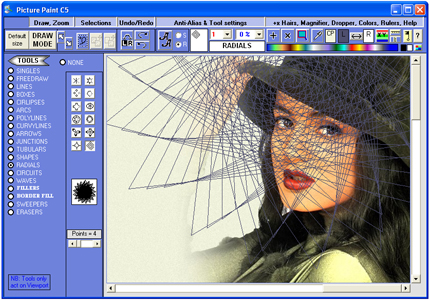
Picture Paint CS5

Picture Paint CS5
Picture Paint is specifically designed to enable users to create their own diagrams, images and scenes. This Picture Paint Software puts together a lot of the things. Picture Paint - pictures paint (painting) software download at picture-paint.com Picture paint + Pictures paint + Pictures Painting + Picture Painting + Picture Paints + Paint a Picture Pictures Paint The rather complicated set of buttons along the top is again set up to give quick access to frequently used functions. Hovering over almost every single button and item shows a tool tip text. Picture Paint - pictures paint (painting) software download at picture-paint.com

Picture Paint CS5

Art & Entertainment icons


4 Feb 2012

Batch Picture Resizer 4.0

https://shopper.mycommerce.com/checkout/cart/add/37213-1?affiliate_id=385336


Why would you need a batch picture resizer? Well, there are some innocent folk out there, who waste their time to watermark, convert or resize pictures one-by-one. After spending hours carrying out such simple tasks, they then complain how difficult it is to use Photoshop even for the easiest of conversion jobs... Jobs that a simple batch picture resizer could do in minutes. Now there is no excuse for such complaints - Batch Picture Resizer is software specifically designed for fast and simple automation of such tasks as image resizing, conversion and watermarking.

Batch Picture Resizer is a new easy and user-friendly picture resizer and watermarking tool. It helps you to resize large groups of pictures in one go for the purpose of sending via email, publishing on the web or just to save space on your hard drive.

Batch Picture Resizer works with the major image formats (including JPG, BMP, RAW, TIFF, GIF, PNG, PCX, TGA etc). It can resize photos with high quality, and flip, mirror or rotate them without losing quality (lossless rotation). The picture resizer offers users a one-click function to optimize color levels or convert pictures to grayscale, while text or image watermarks can be added to protect images.

The program can also be used to resize pictures to a larger one using different filters for better viewing with optimum results. Many cameras can detect and store their orientation relative to the scene, when the image was captured. Picture Resizer can retrieve this information and use it to automatically rotate your images.

https://shopper.mycommerce.com/checkout/cart/add/37213-1?affiliate_id=385336
Main window


http://hotdownloads2.com/trialware/download/Download_PicResize-rn.exe?item=37213-1&affiliate=385336


Key features
  • Resize pictures or image batches in one go
  • Addition tool for text and image watermarks
  • Image conversion using all major formats
  • Command line support
  • Auto rotation of JPEG images
  • Batch lossless image rotation
  • Keeps camera EXIF tags
  • Change canvas size
  • Raw images support (CRW, CR2, NEF, PEF, RAF, RAW, DNG, MNG, etc).
  • 'Rename image files' function in batch mode
  • Fast and easy-to-use batch picture resizer
  • Prompt-free overwrite of files with a new size
  • Automatic save of newly resized images in a separate file
  • Image color level optimization or conversion to grayscale
  • Windows 7 and Vista compliant
  • Compression rate and DPI change for output files

https://shopper.mycommerce.com/checkout/cart/add/37213-1?affiliate_id=385336
Text watermarks


https://shopper.mycommerce.com/checkout/cart/add/37213-1?affiliate_id=385336
Image logo watermarks


3 Feb 2012

Web Data Extraction Software DataToolbar

Web Data Extraction Software DataToolbar
Web data extraction software and web scraping tool. Data Toolbar is an Internet Explorer add-on to rip catalog style information from the web. The web data extractor converts structured web data into a table style format that can be loaded into a spreadsheet or a database. Based on powerful pattern recognition logic it automatically extracts thousands of data records and images from free or subscription web sites. Data Toolbar is designed for everyday business users and requires no technical skill. Simply point to the data fields you want to collect and the wizard does the rest for you. The web scraper is a must-have for anybody who needs to collect the large amounts of data from the Web. Real estate listings, classifieds, online auctions, retail price lists and White pages are typical examples of web pages that you can turn into a useful data source. Data Toolbar can help you easily automate data extraction without any programming.


Features: Collection of data and images directly from the Internet Explorer; Collection of information from Details pages linked to a product catalog; Automatic processing of multi-page lists; Support of irregular, nested multi-row lists mixed with advertisement. Web data extraction software includes a standalone web scraper and web scraping task scheduler.
Related Posts Plugin for WordPress, Blogger...